The FHO+ Billing Guide Problem: Why Tracking Q310–Q313 Is Still So Hard (And How to Automate It)
Four months into FHO+, and most Ontario family doctors we talk to say the same thing: the money is real, but the tracking is exhausting.
Every FHO+ billing guide published since April 1 covers the basics: Q310 for direct patient care, Q311 for telephone care from home, Q312 for indirect care, Q313 for clinical administration, all billed in 15-minute units.
The problem isn't just understanding FHO+
If you're a FHO physician in Ontario, your last four months have probably looked something like this:
No idea what you're missing. Your RA shows aggregated FHO+ revenue, so there's no clean way to spot the days you missed. Did you remember the 45 minutes of lab reviews that should have been Q312? By the time the RA arrives, you can't reconstruct it.
Billing every day is a job in itself. Q312 and Q313 claims require daily activity descriptions. Categorizing each block of time correctly takes long enough that many physicians batch it weekly, or skip days entirely. At $80/hour, every skipped 15-minute unit is $20 gone…
Calculators help, but you still input the data
A handful of fantastic FHO+ time tracking calculators and logger apps have surfaced since April! They're a step up from a paper log, but they share the same flaw as most digital health tools: they live outside your workflow.
You still have to remember to open a separate platform, manually enter your FHO+ hours by category, then flip back to your EMR and enter it all again into your bill book. Two systems, double entry, and the whole thing depends on your memory at the end of a 10-hour clinic day.
The 25% cap is monthly (not daily)
Here's the detail that most FHO+ billing guides gloss over and most calculators get wrong: the 25% cap on indirect care and clinical administration (Q312 + Q313 combined) is a monthly threshold, not a daily one.
The OMA is explicit about this: the limits are prorated over the monthly period. If you go under in one category one week, you can compensate with more hours in that category later in the same month. A heavy charting day where indirect care hits 35% of your billable hours is completely fine (as long as your month balances out)!
Most online calculators can only tell you where you stand today. That leads to two expensive mistakes:
- Leaving money on the table: trimming legitimate Q312 hours on a busy admin day because a daily readout scared you, when your monthly ratio had plenty of room.
- Quietly drifting over the cap: stacking several charting-heavy days without a monthly view, and only discovering the problem at reconciliation. The OMA has noted the ratio caps may not be system-enforced until 2027, which means overpayments today can become clawbacks later.
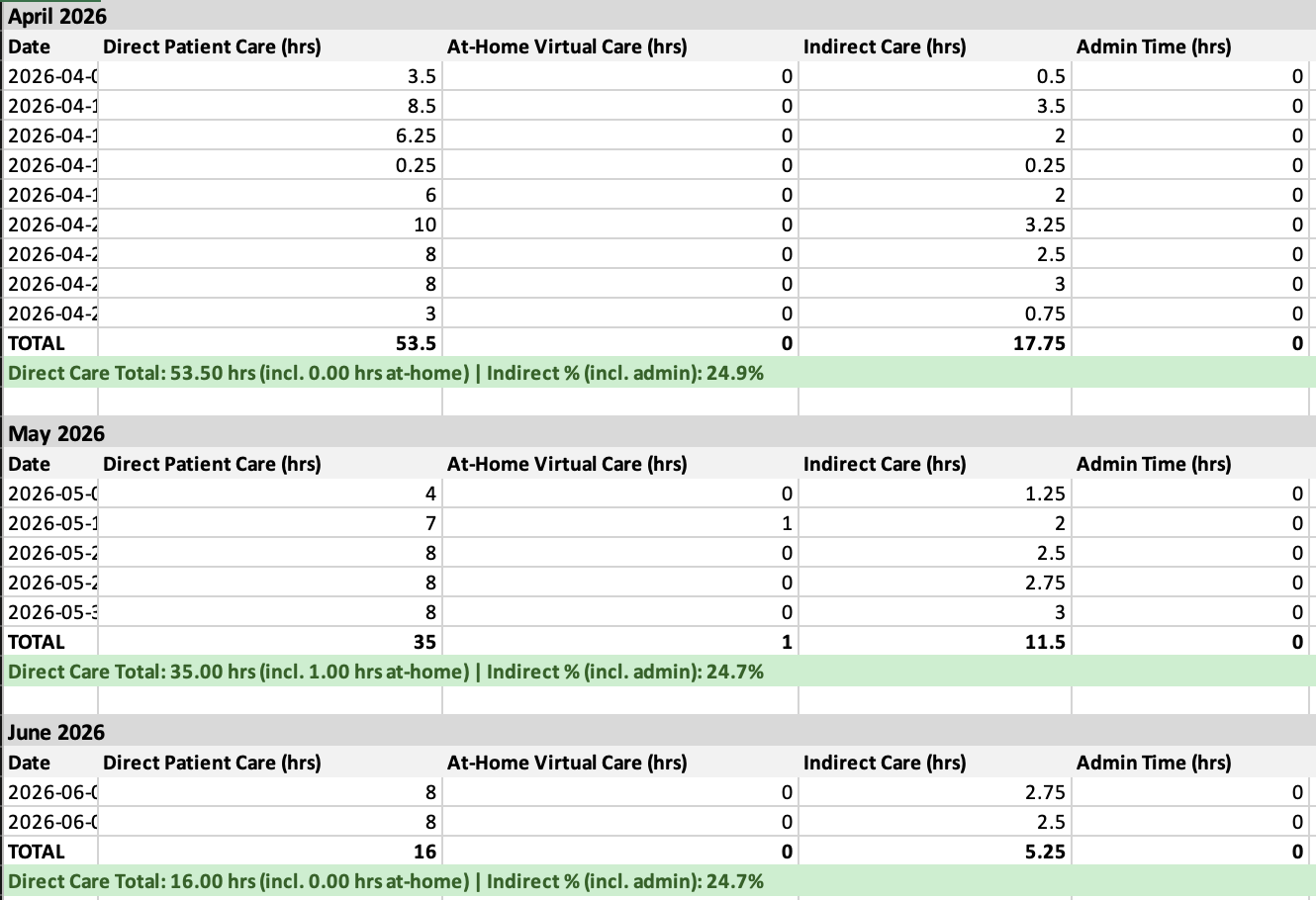
Either way, the fix is the same: you need to see your FHO+ hours at the macro scale. Rolling monthly totals, ratio tracking across Q310, Q311, Q312, and Q313, and a clear picture of how each day fits into the month.
What that macro view could looks like
This is a live monthly rollup from Quip:
Quip makes FHO+ invisible
Quip was built to make the hardest parts of the FHO+ transition disappear:
- Automated input, not just calculation. Quip automates the documentation of your indirect care tasks and captures your hours as you work.
- Straight into your bill book. All units of Q310, Q311, Q312 and Q313 are entered directly into your EMR's bill book, with the correct codes, dates, and unit counts.
- Monthly-first ratio tracking. Your 25% indirect/admin cap and 5% clinical admin cap are tracked the way the Ministry actually measures them, so you can bill confidently on heavy days and catch drift before it becomes a reconciliation problem.
Read more about Quip from our feature on the Medical Post!
FHO+ finally pays you for the work you were already doing. The only thing standing between you and that revenue is the administrative burden of tracking.
Book a demo to see how one input turns your FHO+ hours into a Q310–Q313 entry in your bill book, on PS Suite or Accuro. See the full picture on our FHO+ billing page.